
The best app blockers for Android, compared honestly
 Beyond Alarm29 August 2026 · Updated 1 October 2026 · 7 min read
Photo by Jessica Lewis 🦋 thepaintedsquare on Pexels
Every app blocker on Android is defeatable. Start there, because it changes what you should be shopping for.
They all run as ordinary apps, using either the Accessibility or the Usage Access permission. A determined person can revoke that permission, force-stop the app, or uninstall it. No blocker on this list is a lock. What separates them is how much friction sits between the impulse and Instagram, and whether the block turns itself on without you having to remember.
Short answer:
- If the hours you lose are the night and the morning: Beyond Alarm — the only one here whose morning block starts when your alarm finishes rather than when a clock says so, with a recurring Schedule to cover the night.
- Best general-purpose blocker: AppBlock — apps and websites, the deepest scheduling.
- Free and already on your phone: Digital Wellbeing. Turn it on before you install anything.
The comparison
Capabilities as listed on Google Play on 29 August 2026. Deliberately not a table of download counts — every app here is big enough to be real, and how many people installed something is not why it will or will not work for you.
| App | Blocks websites | Scheduling | Hard to switch off | Knows when you wake |
|---|---|---|---|---|
| AppBlock | Yes | Time, location, Wi-Fi | Strict Mode | No |
| Stay Focused | Yes | Time | Strict Mode | No |
| Freedom | Yes | Time, across devices | Yes | No |
| one sec | No | Always on | A pause, not a block | No |
| Opal | Partly | Time | Yes | No |
| Digital Wellbeing | No | Bedtime, Focus mode | No | No |
| Beyond Alarm | No | Night, morning, on demand | Strictness levels | Yes |
AppBlock — the one most people should install
10 million downloads and 4.7 from 237,000 ratings, which is the strongest combination of scale and satisfaction in this list.
It blocks apps and websites, and its scheduling is the best here by a distance: blocks can trigger on time, location, or which Wi-Fi network you are on — so "block games whenever I am at the office" is a rule it can actually express. Strict Mode makes turning a block off deliberately painful.
Pick it if you want one tool that covers everything and you are willing to spend ten minutes setting up rules.
Treat its numbers with care. Its listing advertises "32% less screen time in the first week" and "95% of our users save at least 2 hours daily". Those are the company's own figures with no published method behind them. The app is good; the statistics are marketing.
Stay Focused — the close second
5M+ downloads, 4.4 from 169K. Apps, websites, blocklists, schedules, Strict Mode — very close to AppBlock in shape. Its "47% less screen time in the first week" is another self-reported figure and should be read the same way.
Pick it if AppBlock's interface does not suit you. This is a genuine preference call rather than a capability gap.
Freedom — the one for people with several devices
1M+ Android installs but only about 8,000 Android ratings, which tells you where Freedom actually lives: it started on desktop and the Android app is one client of a cross-platform service. Block a site once and it is blocked on your Mac, your PC, your iPhone and in Chrome at the same time.
Pick it if the distraction moves between your laptop and your phone — nothing else here follows you across devices.
Skip it if you only have a phone. You would be paying for the part you do not use.
one sec — the one with actual evidence
1M+ downloads and 4.7 from 45.6K. It does not block anything. Open Instagram and it makes you wait, breathe, and see what you were doing — then lets you in.
It is the only app in this comparison whose central claim is backed by peer-reviewed research rather than its own dashboard: a study run with the University of Heidelberg and the Max Planck Institute, published in PNAS, found app usage dropped 57%. That is a real citation, and it is rare in this category.
Pick it if hard blocks make you rebel. A pause you can walk through changes behaviour more than a wall you resent.
Its free tier covers one app. For more you pay.
Opal — the polished, expensive one
500K+ downloads, 4.4 from 8.1K. Well-designed, heavily covered in the press, and the Android version is the weaker sibling of the iOS one. Most of what it is known for sits behind a subscription that is expensive by this category's standards.
Pick it if you already use it on an iPhone and want the phones to match.
Digital Wellbeing — free, installed, underrated
10B+ installs because it ships with Android, and 3.7 stars from 1.47 million people — the lowest rating here by some way.
App timers, Focus mode, and Bedtime mode which fades the screen to greyscale and silences notifications. It costs nothing and it is already there.
That 3.7 is not really about bugs. It is about how easily a timer is dismissed in the moment you most want to dismiss it, which is the reason built-in screen time limits so rarely stick. Still: turn it on tonight before you install anything else. If Bedtime mode alone fixes it, you have saved yourself a subscription.

Beyond Alarm
Beyond Alarm does this part for you: the alarm will not switch off until you have actually moved, and the apps you pick stay locked afterwards.





The thing none of the general blockers do
Every app above blocks by clock or by place. None of them knows when you actually fell asleep, or when you actually got up.
That matters more than it sounds, because the two moments that ruin most days are not office hours:
- The hour after you meant to sleep, which is where the night quietly goes.
- The ten minutes after the alarm, when you are awake, still horizontal, and the phone is already in your hand.
A generic blocker can approximate the first with a schedule. It cannot do the second at all, because it has no idea your alarm just finished — and a block that starts at a fixed time is either too early to be tolerable or too late to be useful. Here is what that costs you in minutes, and when running two apps is still the right call anyway.
This is the gap Beyond Alarm was built in, so read it as the biased section it is. A recurring Schedule shuts your chosen apps — or the whole phone — during a window you set for the night. Morning Lockout starts the moment you finish the wake-up mission, so the apps stay shut while you are getting up rather than from an arbitrary clock time. Phone Block covers everything else: a focus session, exam week, an evening you want back.
Where it deliberately stops: it has limited website blocking through accessible browser address bars. AppBlock, Stay Focused and Freedom all do, and if a browser tab is what costs you the hours then one of those is the better tool and you should install it. Beyond Alarm blocks at the app level, around the two moments a clock alone cannot reach. There is a full comparison of the alarm side here.
Whichever you install, do this first
- Allow autostart and turn off battery optimisation for it. On Xiaomi, vivo, OPPO and realme, a blocker that gets stopped in the background stops blocking, silently, usually about three days in.
- Block fewer apps than you want to. Blocking fifteen apps gets uninstalled by the weekend. Blocking the two you actually lose hours to survives.
- Give it a week before you pay. Every app here has a free tier good enough to find out whether you will leave it switched on.
The blocker you configured beats the blocker you were still researching.
Sources
Download counts, ratings, review counts and update dates were read from each app's Google Play listing on 29 August 2026. Feature claims come from the apps' own Play descriptions on the same date. Screen-time percentages quoted by AppBlock and Stay Focused are their own unaudited figures and are labelled as such above.
- one sec's study in PNAS — the only peer-reviewed effect size in this comparison.
- AppBlock · Stay Focused · Freedom · one sec · Opal · Digital Wellbeing
Common questions
What is the best app blocker for Android?
AppBlock for most people — apps and websites, with schedules that trigger on time, location or Wi-Fi. Stay Focused is the close alternative. one sec is better if you do not want a hard block, only a pause. Beyond Alarm is the one to pick if the blocks you need are tied to going to bed and getting up, because it is the only one that starts a block when your alarm finishes rather than when a clock says so.
Can you get past an app blocker on Android?
Almost always, eventually. Every blocker on Android runs as an ordinary app using the Accessibility or Usage Access permission, so a determined person can revoke the permission, force-stop it, or uninstall it. Strict modes make that slow and annoying rather than impossible. A blocker is friction, not a lock, and that is the honest way to choose one.
Is Digital Wellbeing good enough?
It is free, already installed and worth turning on before you install anything. App timers, Focus mode and Bedtime mode cover the basics. Its weakness is how easily a timer is dismissed in the moment — which is exactly what its 3.7 rating from 1.47 million people is reacting to.
Do app blockers work on Xiaomi, vivo and OPPO?
Less reliably than on stock Android. Those brands stop background apps aggressively, and a blocker that has been stopped cannot block. Whichever you pick, allow autostart and turn off battery optimisation for it, or expect it to quietly stop working after a few days.
Which app blocker blocks websites too?
AppBlock, Stay Focused and Freedom all block websites as well as apps. one sec, Opal and Beyond Alarm work at the app level. If your distraction is a browser tab rather than an app, that narrows the list to three straight away.
Is a free app blocker enough?
For one or two apps on a schedule, yes — AppBlock, Stay Focused, one sec and Digital Wellbeing all have real free tiers. Paying usually buys unlimited blocklists, strict modes that are harder to undo, and cross-device blocking. Try free for a week first; most people find out in that week whether they will actually leave it switched on.
What is the difference between an app blocker and a focus timer?
A focus timer like Forest asks you to commit for a set period and rewards you for not breaking it. A blocker enforces the rule whether or not you remember to start it. If you already open the timer every morning, a timer works. If the problem is that you never remember to, you want a blocker on a schedule.
We build Beyond Alarm, an Android alarm app that will not switch off until you have actually moved. Most of what we write here comes out of problems we hit building it.
Beyond Alarm
An alarm that keeps ringing until you’ve actually moved — then blocks the apps that pull you back to bed. Free to start, no account.
Keep reading
What Beyond Alarm actually does
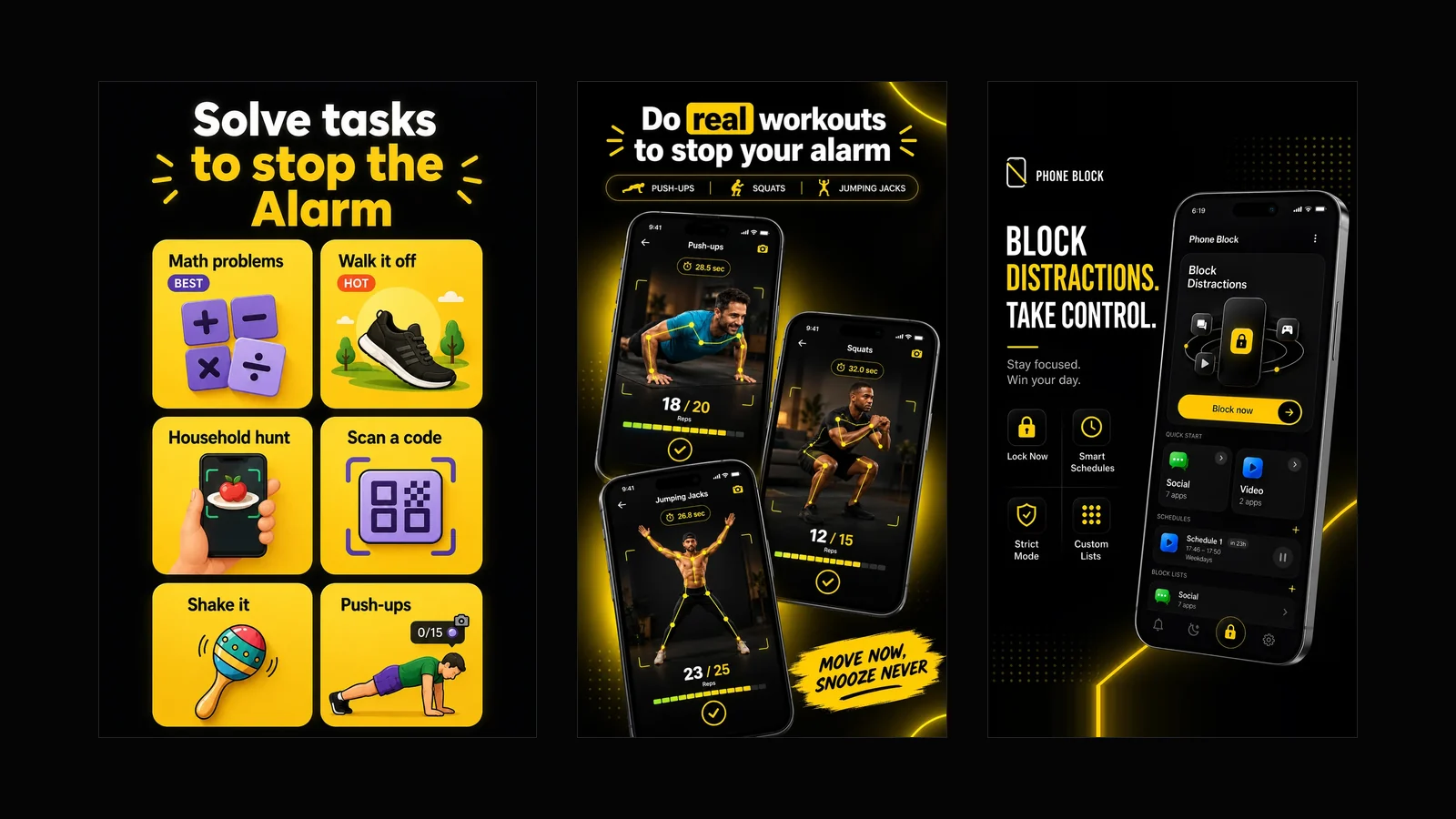
Every part of the app in one page — solve tasks to stop the alarm, kill the morning and night doomscroll, schedule your blocks, lock the phone on a timer. Free with ads, and what it deliberately does not do.

Alarmy vs Beyond Alarm — a straight, feature-by-feature comparison
Missions, pricing, platform support, app blocking, sleep tracking — compared directly, with the numbers dated and sourced rather than asserted.