
One app or two? Running an alarm and an app blocker together
 Beyond Alarm30 August 2026 · Updated 1 October 2026 · 6 min read

Photo by Erik Schereder on Pexels
The standard advice, once somebody works out that the alarm is only half the problem, is to run two apps: something that forces you out of bed, and something that keeps you off Instagram once you are up.
It mostly works. This is not a post arguing that it does not. But there is one join where the arrangement is weaker than it looks, and it happens to be the exact fifteen minutes the whole setup exists for.

The seam, with the arithmetic
An app blocker starts on a clock time. An alarm ends when you actually finish it. Those are never the same minute, because snoozing exists.
Say your alarm is set for 6:30 and your morning block is scheduled 6:30–7:30. A normal morning:
| What happens | |
|---|---|
| 6:30 | Alarm rings. Block turns on. |
| 6:30–6:48 | You snooze twice. Block is running, guarding a phone you are not touching. |
| 6:48 | You finally get up. This is when the block should have started. |
| 7:30 | Block ends — 42 minutes into a morning that began at 6:48. |
| 7:30–7:48 | Unguarded, and this is the tail end of the window that actually mattered. |
Eighteen minutes spent on a sleeping person, and eighteen minutes missing off the end. The block ran for a full hour and covered about two-thirds of what you wanted it to.
You can pad it — start at 6:15, end at 8:15 — and that works. It also means the phone is unavailable for a stretch you did not really need, which is how people end up switching the whole thing off. A rule you resent is a rule you turn off, and that is the failure mode behind most screen time settings.
The blocker cannot fix this, and it is not a flaw in any particular blocker. It has no way to know your alarm finished. There is no Android API that tells a third-party app "the user has just beaten a mission in a different app". The information exists; it simply cannot cross the gap between two processes that were not built together.
Three smaller frictions in the same stack
Two apps to keep alive. On Xiaomi, vivo, OPPO and realme, background apps get stopped aggressively, and a stopped app cannot ring or block. Both apps need autostart allowed and battery optimisation turned off, separately — the full settings walk is here — and either one dying breaks its half. Two apps is two chances for that.
They can block each other. If your blocker is set to a whole category or to the whole phone, the alarm's own mission screen can end up behind the shield. The alarm will still ring — alarms are exempt from almost everything — but a mission that needs the camera may not open. Worth testing once, awake, rather than discovering at 6am.
Two subscriptions. Both categories keep the useful half behind a paywall. That is money well spent if the second app is genuinely doing something the first cannot. It is poor value if you bought it to cover a fifteen-minute gap.

When two apps is the right answer
Plainly, because it often is:
- You need websites blocked, not just apps. No alarm-first app does this. AppBlock, Stay Focused and Freedom all do, and if what costs you the hours is a browser tab, that decides it.
- The distraction follows you to a laptop. Freedom blocks across Mac, Windows, iOS and Chrome at once. Nothing on the alarm side goes near that.
- You want sleep tracking. Sleep as Android is the serious option and it is a different product from an alarm with missions.
- You already have a blocker set up and it works. Do not tear up something that is working to save one app icon.
When one app is the right answer
- The hours you lose are specifically the night and the morning. That is the case the two-app stack handles worst, and it is most of why people go looking in the first place.
- You are on a phone that kills background apps. Halving the number of things that need to survive the night is a real reliability gain, not a tidiness preference.
- You keep forgetting to switch things on. Two apps means two sets of rules to remember to have configured. The version of you at 11pm is not reliable, which is the whole reason to decide any of this in advance.
Beyond Alarm
Beyond Alarm does this part for you: the alarm will not switch off until you have actually moved, and the apps you pick stay locked afterwards.





The comparison, honestly
| Two apps | One app | |
|---|---|---|
| Morning block starts | On a clock time you guessed | When the alarm is actually beaten |
| Websites | Yes, with the right blocker | No |
| Across your laptop | Yes, with Freedom | No |
| Sleep tracking | Yes, with the right alarm | No |
| Apps to keep alive on Android | Two | One |
| Cost | Usually two subscriptions | One |
Read that honestly and the answer is not "one app always wins". It is that the top row and the bottom three are the case for one, and the middle three are the case for two. Which set matters more is a fact about you, not about the apps.
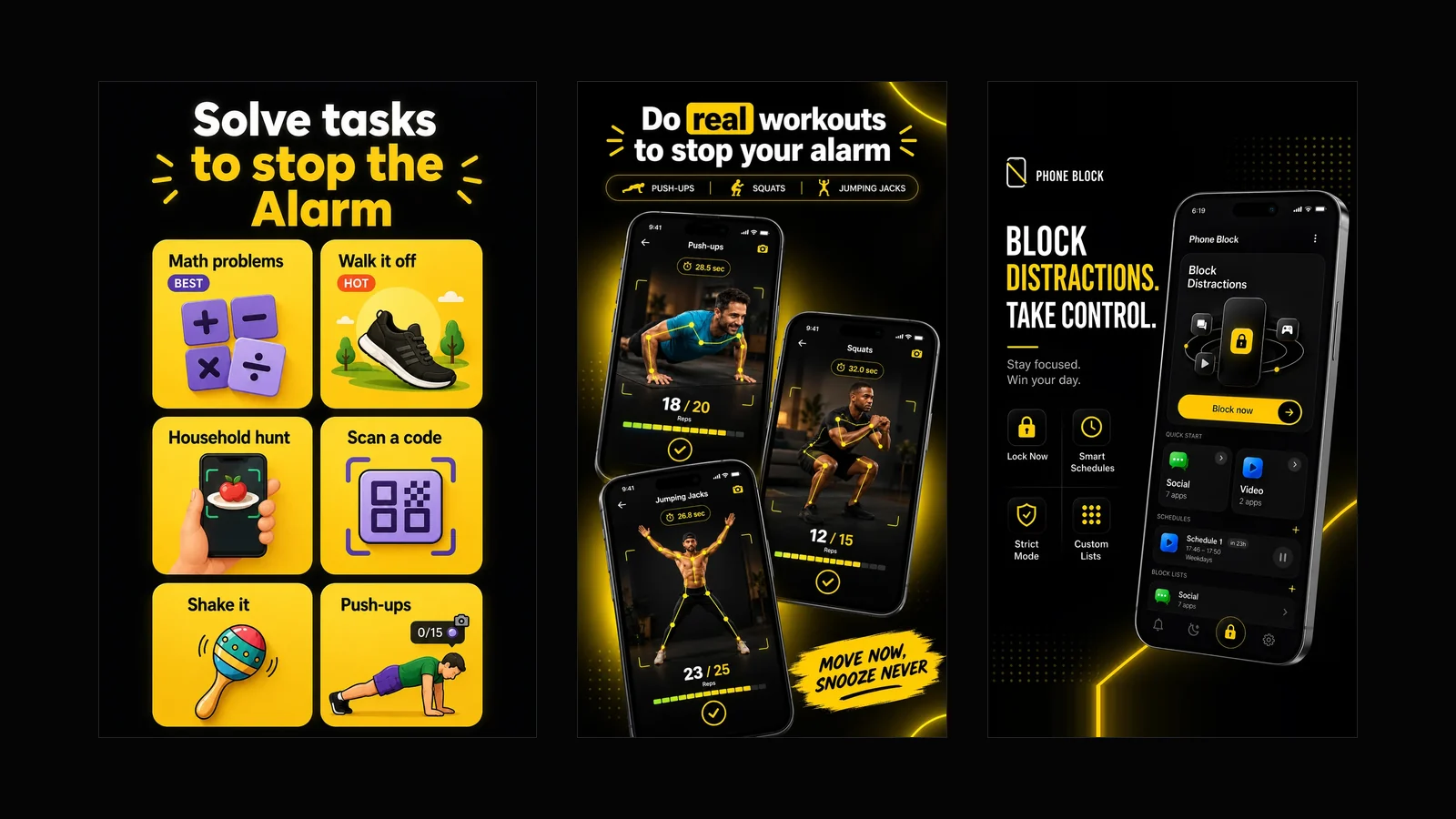
This is the gap Beyond Alarm was built in, so read it as the biased section it is. The alarm has the missions — push-ups, squats and jumping jacks counted by the camera, a photo of somewhere you have to walk to, a household hunt, a step count — and Morning Lockout starts the moment the mission is finished, not at a time you guessed the night before. No padding, no eighteen minutes spent guarding a sleeping person, no gap at the end. A recurring Schedule closes the other end of the day, and Phone Block covers everything in between. Where it deliberately stops is the middle of that table: limited browser-based website blocking, nothing on your laptop, no sleep tracking. If those are your rows, build the two-app stack and pad the schedule. If the top row is your row, one app is the whole argument. Beyond Alarm is free on Google Play.
If you are staying with two apps
Get the most out of it:
- Start the block at your alarm time and end it later than feels necessary. The tail is what covers the snoozing you did not plan for.
- Allow the alarm app through the blocker, or keep the block to specific apps rather than the whole phone.
- Do the battery settings for both, on the same evening, so you are not debugging one of them in a fortnight.
- Test the whole chain once on a weekend morning — alarm, mission, block — before you rely on it for work.
And if the alarm half is the part letting you down, the apps that make getting up genuinely hard to skip are compared here — including which of their missions you can still finish lying down, which is the thing that decides whether any of the rest of it matters.
Sources
Feature claims about the apps named here come from their Google Play listings, read on 29 August 2026. The morning timeline is worked arithmetic from a 6:30 alarm with two nine-minute snoozes against a 6:30–7:30 block — the numbers are an illustration, not a measurement, and you can substitute your own alarm time and snooze habit and get the same shape.
- The best alarm apps that actually make you get out of bed
- The best app blockers for Android, compared honestly
For the practical setup, see how to block social media after your alarm on Android, including a short test and the apps to leave available.
Common questions
Can I use an alarm app and an app blocker at the same time?
Yes, and for most of the day it works well. The join to watch is the morning: a blocker starts on a clock time, an alarm ends whenever you actually finish it, and snoozing means those are almost never the same minute. Everything else about the pairing is fine.
Should I use one app for both instead?
If the hours you lose are specifically the night and the morning, one app is better — the block can start the moment the alarm is beaten instead of guessing when that was. If you also need website blocking, blocking across a laptop, or sleep tracking, you need two, because no single app does all of that well.
What time should I set a morning app block for?
If you are using a separate blocker, set it to start at your alarm time and run about thirty minutes longer than you think you need. It will waste the first stretch while you are still asleep, and the tail is what covers the snoozing you did not plan for. That padding is the price of two apps not talking to each other.
Will an app blocker block my alarm app?
It can, if you block by category or block the whole phone. The alarm itself will still ring, but a mission that needs the camera or another screen can end up behind the shield. Check it once, awake, before you rely on it — add the alarm app to the allowed list if your blocker has one.
Is two apps worse for reliability on Android?
On Xiaomi, vivo, OPPO and realme, yes. Both apps need autostart allowed and battery optimisation turned off, separately, and either one being stopped in the background breaks its half of the arrangement. Two apps is two chances for that to happen.
Does using two apps cost more?
Usually. Both categories put their useful features behind a subscription, so a two-app stack is two of them. That is worth it if you genuinely need what the second app adds and poor value if you are buying it to cover a fifteen-minute gap.
We build Beyond Alarm, an Android alarm app that will not switch off until you have actually moved. Most of what we write here comes out of problems we hit building it.
Beyond Alarm
An alarm that keeps ringing until you’ve actually moved — then blocks the apps that pull you back to bed. Free to start, no account.
Keep reading
What Beyond Alarm actually does
Every part of the app in one page — solve tasks to stop the alarm, kill the morning and night doomscroll, schedule your blocks, lock the phone on a timer. Free with ads, and what it deliberately does not do.

Alarmy vs Beyond Alarm — a straight, feature-by-feature comparison
Missions, pricing, platform support, app blocking, sleep tracking — compared directly, with the numbers dated and sourced rather than asserted.