
Why your alarm doesn't go off on Xiaomi, vivo, OPPO and realme phones
 Beyond Alarm11 August 2026 · 6 min read

If you have ever missed something important because an alarm app stayed silent, you have probably already been told to "check your permissions" by someone who did not tell you which one. This post is the specific answer.
The short version: several Android manufacturers aggressively close background apps to extend battery life, and on those phones an app that was scheduled to wake you at 6am can be killed at 2am. The app did not crash. It was removed from memory, and the alarm it registered went with it.
Why this happens at all
Android itself has a proper mechanism for this. An app can register an exact alarm with the system — not a reminder, not a background job, but an entry in a system-level clock that is designed to fire on time even when the device is in deep sleep. Handled properly, that survives Doze mode and needs no network.
The problem is that some manufacturers layer their own battery management on top of stock Android. That layer is more aggressive than Google's, and it does two things:
- It force-stops apps it decides you are not using much.
- On some versions, force-stopping an app also clears the alarms it registered.
Once that happens there is nothing left to fire. The app is not asleep — as far as the system is concerned, it no longer has anything scheduled.
If the alarm is firing and you are sleeping through it, the cause is different and so is the fix — that is either sleep inertia or an alarm that is quieter than you think it is, not battery management.
This is why the failure is so maddeningly inconsistent. It works for days, because you have been opening the app. Then you have a busy week, do not open it, and the phone quietly decides the app is dormant.
The setting you are looking for
It has a different name on every brand, which is a large part of why this problem is so hard to search for. It is roughly the same switch each time:
| Brand | What it is called | Where |
|---|---|---|
| Xiaomi / Redmi / POCO | Autostart | Settings → Apps → Permissions → Autostart |
| vivo / iQOO | Auto-start and High background power consumption | Settings → Battery → Background power consumption |
| OPPO / realme / OnePlus | Allow auto-launch, battery set to Don't optimise | Settings → Battery → App battery usage |
| Samsung | Remove from sleeping apps / Deep sleeping apps | Settings → Battery → Background usage limits |
| Huawei | Manage manually: auto-launch, secondary launch, run in background | Settings → Battery → App launch |
What each setting actually controls
| Setting | What it stops | Can an app check it? |
|---|---|---|
| Autostart / auto-launch | The app being force-stopped when idle | No |
| Battery optimisation | The system deferring its work to save power | Yes |
| Alarms & reminders | Scheduling an exact, doze-exempt alarm | Yes |
| Notifications | The alarm surfacing at all | Yes |
| Full-screen intent | The ring screen appearing over the lock screen | Yes |
That last column is the whole problem: the one setting that matters most is the one nothing can verify.
On top of that, on almost every Android phone you also want:
- Battery optimisation: off for the alarm app, or "unrestricted"
- Alarms & reminders permission granted (Android 12+)
- Notifications allowed, including full-screen notifications on Android 14+, which is what lets the alarm appear over your lock screen
- Do Not Disturb: allow alarms through, if you sleep with DND on
The thing nobody can automate
Here is the honest bit, and it is the reason this post exists.
No app can check whether autostart is enabled. There is no public Android API that exposes it. An app can read whether it has notification permission, whether battery optimisation is off, whether it can schedule exact alarms — all of that is queryable. Autostart is not. It sits in a manufacturer's own settings app, behind a screen that varies between two phones from the same brand running the same Android version.
So any app that tells you "everything is configured correctly" on a Xiaomi phone is guessing about the single most important switch. The best a developer can honestly do is tell you the setting exists, deep-link you as close to it as the manufacturer allows, and then ask you to confirm you have done it.
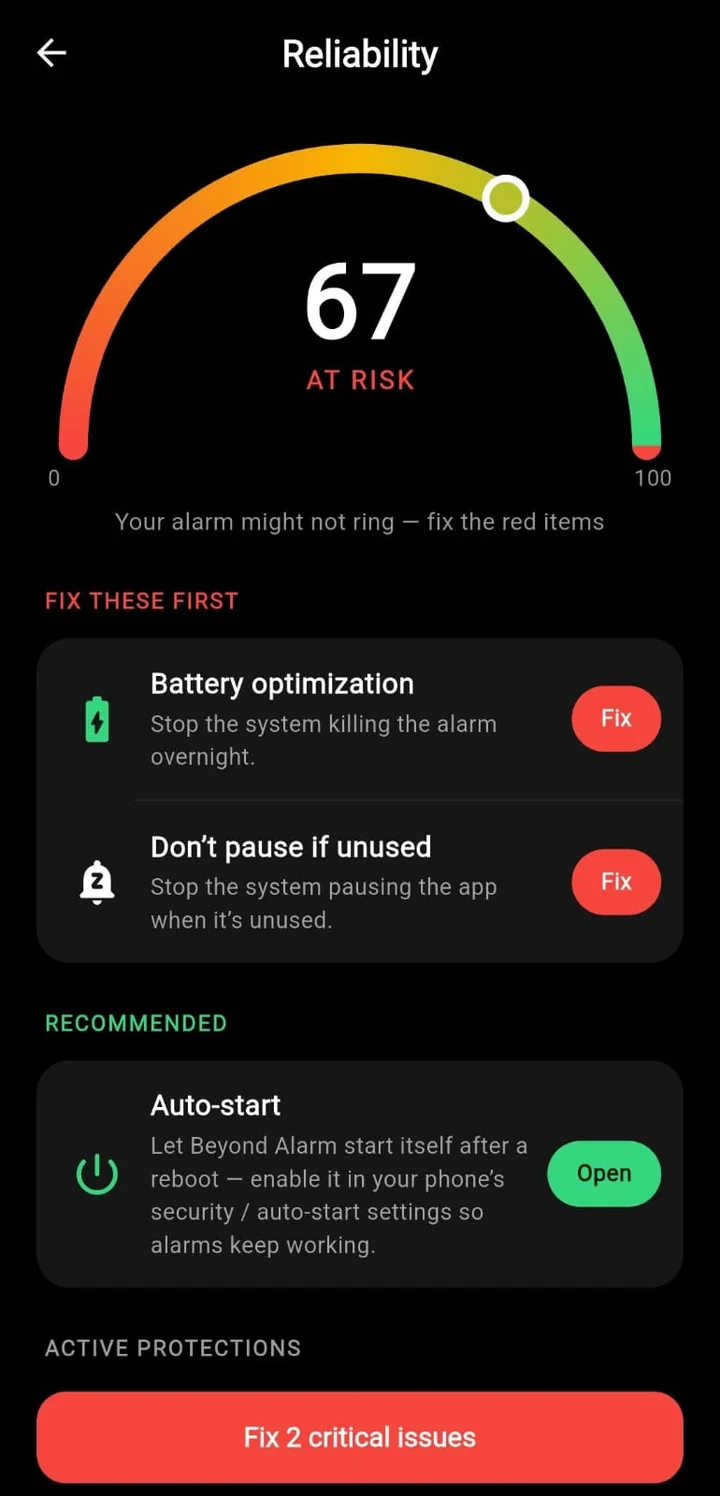
That is what the distinction looks like in practice. Two items the app can verify and fix itself; one it can only point at.
That is unsatisfying. It is also the truth, and I would rather say it than pretend the problem is solved.
This is exactly why Beyond Alarm has a reliability dashboard rather than a "you're all set" screen. It checks everything that is actually readable — exact alarms, battery optimisation, notifications, full-screen intent — and shows you a score. Autostart is the one item it cannot verify, so it says so and asks you to confirm it manually, instead of quietly counting it as done.
Beyond Alarm
Beyond Alarm does this part for you: the alarm will not switch off until you have actually moved, and the apps you pick stay locked afterwards.





Test it properly, tonight
Do not test an alarm by setting it for two minutes' time. That proves nothing, because the app is still in memory. The failure you care about happens after hours of the phone sitting idle.
The real test:
- Set the alarm for its normal time.
- Force-stop the app (long-press the icon → App info → Force stop). This simulates what the battery manager does at 2am.
- Leave the phone alone overnight, unplugged, screen off.
- See if it rings.
If it survives a force-stop, it will survive the battery manager. If it does not, no amount of hoping will fix it — go back to the table above.
A second test worth doing once: restart your phone and check the alarm is still scheduled. A well-built alarm app re-registers everything on boot. One that does not will silently lose every alarm the first time your phone updates overnight.
What to do if you have already missed something important

Two things, in order.
Stop trusting one alarm. Until you have verified the above with a force-stop test, set a second alarm on a different device — a laptop, a smart speaker, an actual alarm clock. This is not a comment on any particular app; it is what you do with any system you have not yet proven.
Then fix the setting and prove it. Once you have run the force-stop test twice and it rang both times, you can go back to one alarm with some confidence.
If the alarm is firing but you are sleeping through it, that is a different problem — see why you turn off your alarm in your sleep.
The one-line summary
If your alarm app is unreliable on a Chinese-brand Android phone, it is almost certainly autostart, it is not something the app can detect or fix on its own, and the only way to know you have solved it is to force-stop the app and see whether it still rings in the morning.
And if the alarm does fire but makes no sound, this is not your problem — that is a mode rather than a missing schedule, and Do Not Disturb has three ways of muting an alarm that are worth ruling out first.
And if you have done all of the above and the app is still unreliable, the app is the variable left — the alternatives are compared here.
If the alarm only failed after the phone restarted overnight, that is a different cause with a different fix — here is why a restart silences alarms, and how to stop it.
Common questions
Why does my alarm work for a week and then fail once?
Because the battery manager only force-stops apps it decides are dormant. While you are opening the app daily it stays alive. Go a few days without opening it and it becomes a candidate, which is why the failure always seems to land on the morning it mattered.
Does this affect the built-in clock app too?
Almost never. Manufacturers exempt their own system clock from the battery manager. That is why the stock alarm seems more reliable. It is not better written, it is on the allow list.
Will Do Not Disturb silence my alarm?
It can, depending on how DND is configured. Most Android versions let alarms through by default, but a custom DND schedule can block them. Check Settings, Do Not Disturb, and confirm alarms are allowed.
Is this a problem on Pixel and stock Android?
Much less so. Pixel and near-stock devices use Google's own Doze, which an exact alarm is designed to survive. The aggressive layer is added by manufacturers on top of Android, so the problem is concentrated on Xiaomi, vivo, OPPO, realme and to a lesser extent Samsung.
We build Beyond Alarm, an Android alarm app that will not switch off until you have actually moved. Most of what we write here comes out of problems we hit building it.
Beyond Alarm
An alarm that keeps ringing until you’ve actually moved — then blocks the apps that pull you back to bed. Free to start, no account.
Keep reading
Alarm didn't go off after your phone restarted? Here's why it happens on Android
After a restart, Android keeps most apps locked until you first unlock the phone — so an alarm set in one can stay silent. Why, which case you hit, and how to stop it happening overnight.
Turning your phone off to stop the alarm? How to close that loophole on Android
If you power your phone off, uninstall the app or hit Home to escape a mission alarm, here is what Android 12 changed, what an app can still stop, and the one escape nothing can block.