
Why your app blocker stops working after a phone update
 Beyond Alarm22 September 2026 · 5 min read
Somebody who searches this is usually staring at a phone that was doing its job until yesterday. The blocker's code almost never breaks on its own. What breaks is one of three separate Android or manufacturer settings, reset by an update rather than by anything the app did — and each one needs a different fix.
It is almost never the app's own code
An app blocker on Android works by holding an accessibility service connection open — the same API screen readers use — watching which app just came to the front and covering it before it finishes loading. That code either works or it doesn't, and it doesn't degrade with time.
What does degrade with time is permission. Three things stand between "the service is installed" and "the service is actually running right now," and an update is exactly when any of them can get switched back off.
Three different things reset, and updates trigger all three
| What resets | Who resets it | How you'd notice |
|---|---|---|
| The manufacturer's autostart / background allow-list | The phone's own battery manager, on a system update | The blocker's toggle looks on, but blocked apps open with no shield |
| Runtime permissions (notifications, in particular) | Android itself, after a few months unused | Blocking still works, but you stop seeing the "app blocked" notification |
| The accessibility service's live connection | An app update replacing the APK | Settings shows Accessibility as on; the app still isn't watching |
The first two are documented, dated mechanisms. The third is the one nobody names, and it's the one worth reading to the end for.
Android's own auto-reset is real, but narrower than people assume
Since Android 11, the system automatically resets an app's permissions if it goes unused for a few months — and it's worth being precise about what that actually covers, because the imprecise version of this claim is everywhere.
If your app targets Android 11 or higher and isn't used for a few months, the system protects user data by automatically resetting the sensitive runtime permissions that the user had granted your app... The system resets only runtime permissions, which are the permissions that display a runtime prompt to the user when requested. — Android Developers: Permissions updates in Android 11
Accessibility access is a special permission, granted in its own settings screen — not a runtime one — so this specific mechanism does not touch it. What it does reset, quietly, is Notifications, which became a runtime permission in Android 13. Lose that one and the blocker can be enforcing correctly while you stop seeing any sign that it's running at all.
The manufacturer's own layer resets its own list
This is the same family of setting that breaks alarms on Xiaomi, vivo and OPPO phones — autostart, background power, "don't optimise" — and app blocking needs the identical allow-list entry an alarm does, for the identical reason: both depend on a background component the manufacturer's battery manager is specifically built to kill.
The part that's harder to prove, because nobody at Google or Samsung documents it in public, is that a system update can put a phone's own allow-list back to its factory defaults — even for an app you'd already switched on. Search Samsung's own community forums for "accessibility keeps turning off" or "One UI update killing accessibility" and you'll find the same report repeated across phones and across years, right after a One UI version bump. It isn't rare, and it isn't one phone.
The fix is the one from the alarm post, repeated for whichever brand you're on: find autostart (Xiaomi), background power (vivo), "don't optimise" (OPPO/realme), or remove from sleeping apps (Samsung), and check it again after every update — not just once.
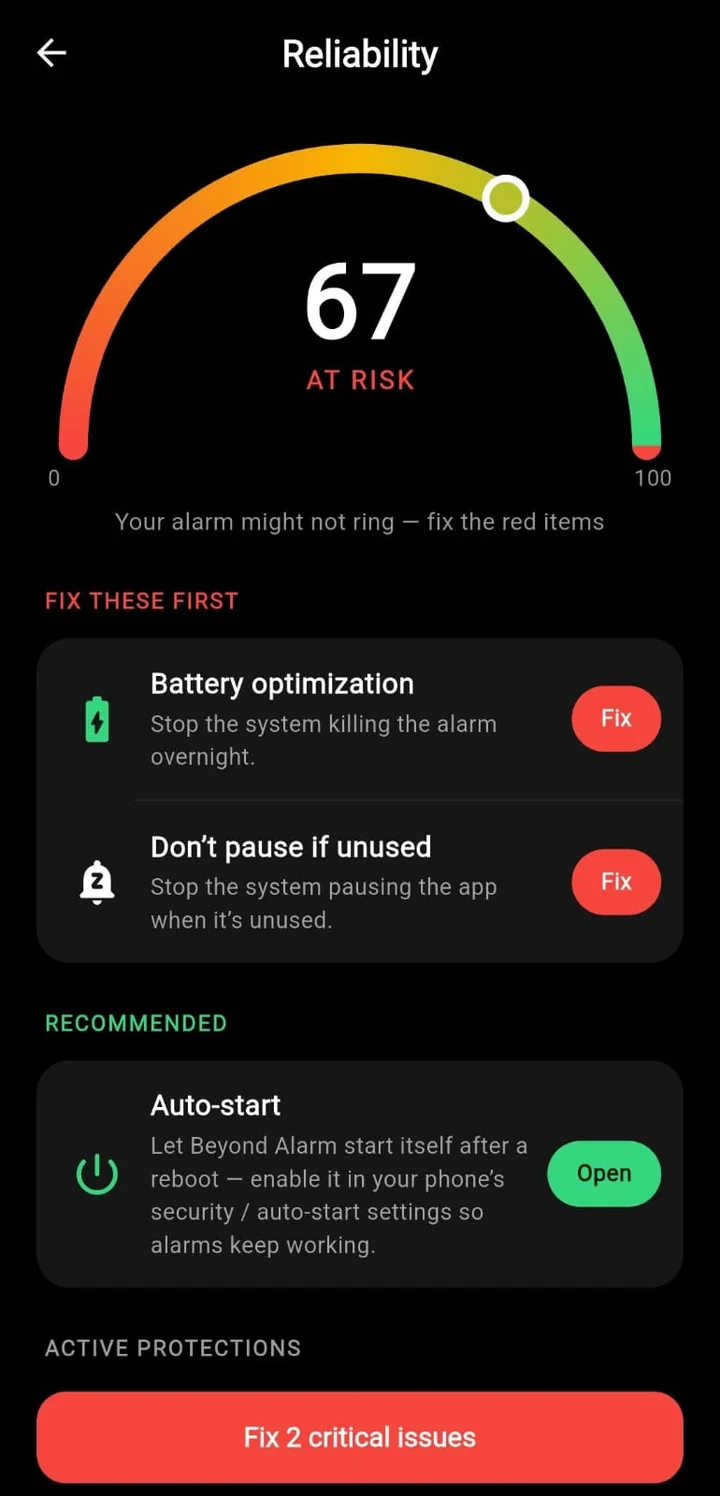
I built the reliability check in Beyond Alarm to re-read these settings on every launch rather than trusting the state it saw during setup, precisely because of this — a check done once, at install, tells you nothing about what a manufacturer's update did to it six weeks later.
Beyond Alarm
Beyond Alarm does this part for you: the alarm will not switch off until you have actually moved, and the apps you pick stay locked afterwards.





The quirk almost nobody names: the toggle can lie
Here's the one that's genuinely rare knowledge, and the reason this post exists rather than just linking back to the alarm one.
An accessibility service is a long-lived connection between your app and the system's accessibility manager. Replacing the APK — which is exactly what an app update is — kills that connection, and on several manufacturers the system does not reliably reopen it on its own. The toggle in Settings still reads "on," because the toggle only reflects whether you granted the permission, not whether the connection is currently live. The blocker looks enabled and isn't doing anything.
This is common enough that it has its own folk fix, repeated across Samsung's own support forums: turn the toggle off, then back on. That forces a fresh connection. It's not a setting you configure once — it's a step you may need to repeat after any update that touches the app, on some phones every single time.
Test it properly, not by looking at a toggle
Looking at the Accessibility switch proves the permission survived. It does not prove the service is running. The only real test:
- Open a blocked app on purpose.
- Confirm the shield actually appears — not just that the toggle is on.
- If it doesn't, toggle accessibility off and back on, then repeat step 1.
- If it still doesn't, go through the manufacturer table above — the allow-list reset is the more common cause of the two.
Do this the same day you install any system update, not the next time you happen to notice the block failed — by then you won't know how long it's been off.
The once-a-month checklist
- Open a blocked app on purpose and confirm the shield appears
- Re-check autostart / background power / "don't optimise" for your brand
- Confirm Notifications is still granted, especially after being unused a while
- After any accessibility toggle looks stuck: switch it off, then on
None of this is a flaw unique to one blocker. It's the layer every Android app-blocking tool sits on top of, Beyond Alarm included — and a scheduled block that runs itself at fixed hours is exactly as exposed to it as one you switch on by hand, because both depend on the same accessibility connection surviving the same updates.
If what actually failed was the alarm itself rather than the block that follows it, the mechanism is a close cousin of this one — autostart is the usual cause there too, just with a different symptom.
Common questions
Does this happen after an Android system update, an app update, or both?
Both, and for different reasons. A system update can reset the phone manufacturer's own battery allow-list back to its factory default. An app update can leave the accessibility service disconnected even though the toggle in Settings still shows it as on.
If I turn off battery optimisation, is that the whole fix?
It's necessary, not sufficient. Battery optimisation, autostart and the accessibility connection are three separate switches, and a manufacturer's update can reset any of them independently of the other two.
Does this affect the built-in Digital Wellbeing or Focus Mode too?
Rarely. It's a pre-installed system app, so it's already on the manufacturer's allow-list and doesn't need autostart or an accessibility connection the way a third-party blocker does.
How do I actually check whether it's broken right now?
Don't just open the blocker and look at its toggle — that only proves the Settings entry survived, not that the connection did. Open a blocked app on purpose and see whether the shield actually appears.
We build Beyond Alarm, an Android alarm app that will not switch off until you have actually moved. Most of what we write here comes out of problems we hit building it.
Beyond Alarm
An alarm that keeps ringing until you’ve actually moved — then blocks the apps that pull you back to bed. Free to start, no account.
Keep reading
Why your alarm is too quiet on Android, even at full volume
Your alarm rang and it wasn't loud enough to wake you. Two volumes are multiplied together before you hear anything, and neither of them behaves the way the slider implies. Here is what each one does.
Why your alarm didn't go off with Do Not Disturb on
Alarms are supposed to be exempt from Do Not Disturb, and almost always are. There are three ways they are not — and on Android 14 and up the most likely one is a mode you turn on every night on purpose.