
Beyond Alarm vs Sleep as Android
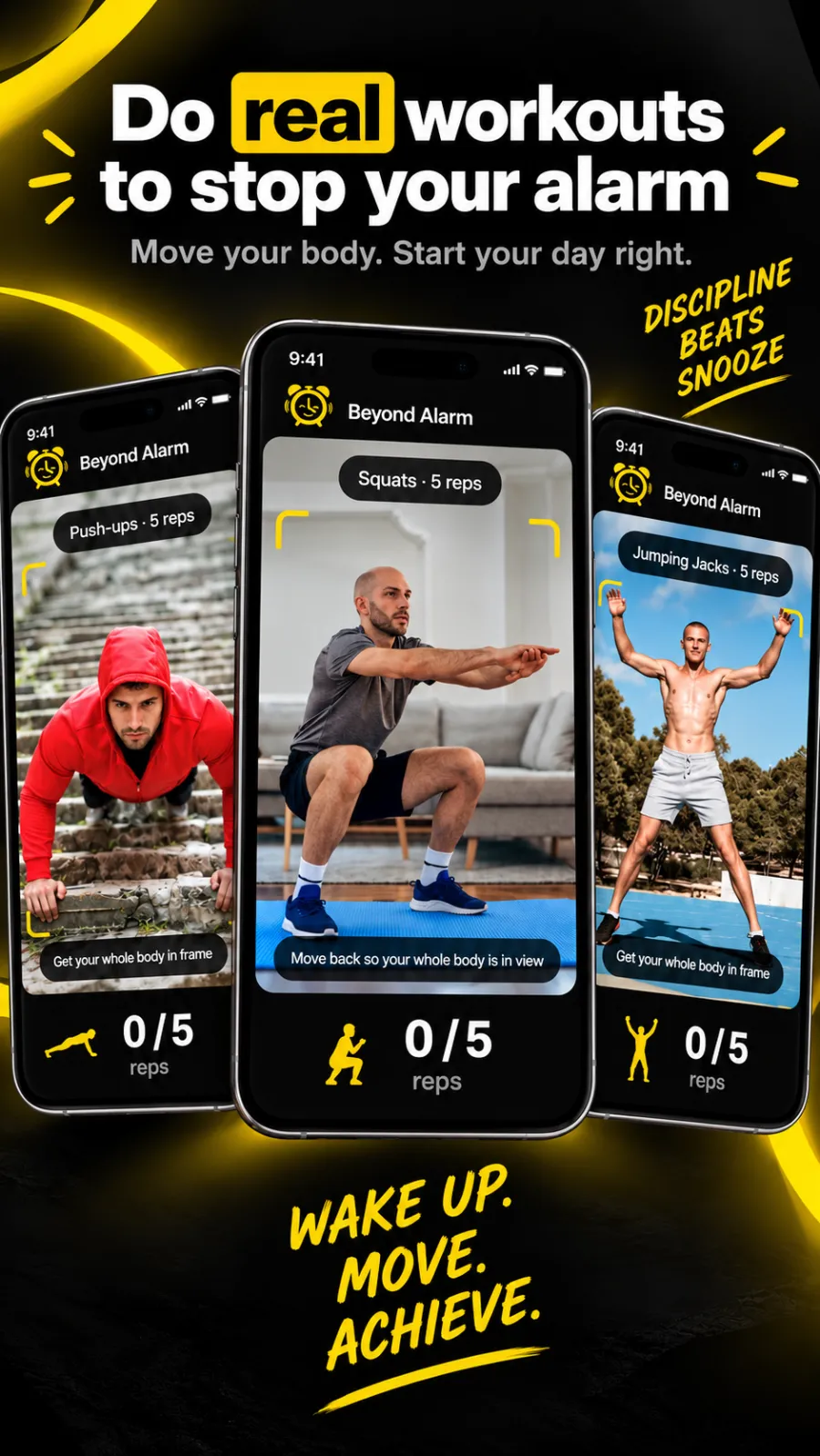
Pick Beyond Alarm if the goal is getting up and staying up. Its missions include push-ups, squats and jumping jacks counted by the camera, every mission is free right now, and Morning Lockout keeps your apps shut once you are out of bed.


Sleep as Android and Beyond Alarm both make you do something before the alarm stops. Beyond Alarm makes that something physical, then makes sure the phone doesn't pull you back in afterwards.
The short answer
- Exercise that is counted. Push-ups, squats and jumping jacks counted rep by rep by the camera, on the device.
- Morning Lockout blocks your chosen apps the moment you beat the alarm.
- Every mission free right now; Pro removes ads.
- Android and iPhone. Beyond Alarm is on both stores.
Side by side
Sleep as Android's column comes from its own Play listing and website at the time of writing (27 October 2026). "—" means neither mentions it.
| Feature | Beyond Alarm | Sleep as Android |
|---|---|---|
| Task to stop the alarm | ✓ 11 missions | ✓ CAPTCHA tasks |
| Camera-counted push-ups, squats, jumping jacks | ✓ | — |
| Maths | ✓ | ✓ |
| Shake | ✓ | ✓ |
| Barcode / QR code | ✓ | ✓ QR code or NFC tag |
| Snooze limit | ✓ | ✓ |
| Gentle start | ✓ Volume rises gradually | ✓ Gentle alarm sounds |
| Apps locked when you beat the alarm | ✓ Morning Lockout | — |
| On-demand app blocker with no stop button | ✓ Strict mode, free after one ad | — |
| Price | All missions free right now; Pro removes ads | 7 days of premium, then freemium or upgrade |
| Platforms | Android 7.0+, iPhone (iOS 26.1+) | Android |
Where Beyond Alarm pulls ahead
A task you can't do lying down
Maths and shaking can be done half asleep. Beyond Alarm's camera missions count real push-ups, squats or jumping jacks, and the alarm keeps going until the set is done. Pose detection runs on the phone itself.
The phone stays out of the way afterwards
Getting up is half the morning. The other half is not losing the next twenty minutes to a feed. Morning Lockout starts the moment you finish your mission and keeps your chosen apps shut for the time you set — or, on Android, the whole phone, with calls still allowed.
A blocker for the rest of the day
The same app runs Phone Block, from 5 minutes to 8 hours. Strict mode has no stop button and is free after one short ad.
Beyond Alarm
Beyond Alarm does this part for you: the alarm will not switch off until you have actually moved, and the apps you pick stay locked afterwards.



What Sleep as Android offers
At the time of writing, Sleep as Android's Play listing describes sleep-cycle tracking with smart wake-up, contactless Sonar tracking, snoring and sleep-talk detection, lullabies, sunrise alarms, Spotify alarms, a snooze limit and CAPTCHA tasks. It lists integrations with many wearables, smart lights, Health Connect and automation tools. Its documentation lists CAPTCHAs including simple and typed maths, QR code or NFC tag, shake, and more in a free add-on. The listing offers 7 days of premium, then freemium or an upgrade.
Switching from Sleep as Android
- Install Beyond Alarm and follow its reliability screen — battery optimisation, autostart and exact alarms — so it rings on time.
- Recreate your alarms and repeat days.
- Swap your CAPTCHAs for missions: maths, shake or a barcode on something in the kitchen.
- Add a camera exercise, such as ten squats, as a second mission.
- Turn on Morning Lockout for the apps you reach for first.
- Turn off the old alarms so only one app rings. You can keep Sleep as Android for sleep tracking if you use it.
Sources
Checked on 27 October 2026. Listings change, so check them before relying on any detail. Beyond Alarm's details are checked against its own code.
Common questions
What is the difference between Sleep as Android and Beyond Alarm?
Sleep as Android centres on sleep tracking and smart wake-up, with CAPTCHA tasks to stop the alarm. Beyond Alarm centres on getting you up and keeping you off your phone — camera-counted exercise missions, then a Morning Lockout that blocks your chosen apps once you're up.
Is Beyond Alarm free?
Yes. Every mission is free during the current promotion, and Phone Block's Strict mode unlocks after one short ad. Pro removes ads.
Does Sleep as Android block apps after the alarm?
At the time of writing, its Play listing and website don't mention blocking other apps. Beyond Alarm's Morning Lockout does that the moment you finish your wake-up mission.
Does Beyond Alarm work on iPhone?
Yes, on iOS 26.1 and later, with alarms on Apple's AlarmKit and app blocking through Screen Time. Sleep as Android's listing and website describe an Android app.
How do I switch from Sleep as Android to Beyond Alarm?
Install Beyond Alarm, recreate your alarms, choose missions similar to your CAPTCHAs — maths, shake, barcode — then add a camera exercise and turn on Morning Lockout.
Beyond Alarm
An alarm that keeps ringing until you’ve actually moved — then blocks the apps that pull you back to bed. Free to start, no account.
More compare
Beyond Alarm vs Alarmy
Same mission idea, plus camera-counted reps, free missions right now and a lockout after you wake.
Beyond Alarm vs AppBlock
A no-stop-button block that's free after one ad, plus an alarm that starts the lockout when you're up.
Beyond Alarm vs Opal
Free Strict mode after one ad, whole-phone blocking on Android, and a lockout that starts when you wake.
Beyond Alarm vs Stay Focused
Free Strict mode after one ad, camera-counted wake-up workouts, and a lockout tied to your alarm.
Beyond Alarm vs Freedom
A no-stop-button phone block that's free after one ad, with an alarm that starts the lockout when you wake.
Beyond Alarm vs one sec
A real block with no stop button, free after one ad, for as many apps as you like — plus a morning lockout.
Beyond Alarm vs Digital Wellbeing
Digital Wellbeing turns off with a tap. Beyond Alarm's Strict mode has no stop button, free after one ad.
Beyond Alarm vs Apple Screen Time
Apple's own blocking, plus a free no-stop-button Strict mode and a lockout that starts when you wake.
Beyond Alarm vs Alarm Clock Xtreme
Eleven missions free right now, camera-counted workouts, and a lockout that starts when you're up.