
Alarmy alternative? The best app for each reason people switch
 Beyond Alarm31 August 2026 · Updated 9 September 2026 · 7 min read

Photo by Vitaly Gariev on Pexels
Start with the uncomfortable bit: Alarmy is genuinely good. 50 million downloads, 4.6 stars from over two million ratings, and more ways to force you out of bed than anything else in the category. If you have not tried it and you sleep through alarms, try it before you read the rest of this.
People do not usually look for an alternative because it is bad. They look for a specific reason — and because the reasons are opposite to each other, there is no single replacement. So this is organised by the reason, not by a ranking.
Which reason is yours?
| If you are leaving because… | Try |
|---|---|
| It does too much and gets in the way | Alarm Clock Xtreme |
| You want sleep tracking done properly | Sleep as Android |
| You want something tiny and simple | QRAlarm |
| You get up, then lose the morning to your phone | Beyond Alarm |
| You want the missions but not the subscription | Alarm Clock Xtreme, or QRAlarm |
| It is not ringing at all | Nothing — that is a phone setting |
That last row catches more people than it should, so it goes first.
"It doesn't go off at all"
This is almost never the app, and switching will not fix it. On Xiaomi, vivo, OPPO and realme, aggressive battery management stops background apps, and an alarm that has been stopped cannot ring. Every alarm app on Android has this problem equally, so an app you leave for this reason will disappoint you in exactly the same way in about a week.
Allow autostart and turn off battery optimisation for whichever app you are on — the settings, per manufacturer, are here — and check whether the problem was ever Alarmy's.
"It does too much" → Alarm Clock Xtreme
Also 50M+ downloads, 4.5 from 1.24 million ratings, made by AVG Labs. Gradual volume, an oversized snooze button so you do not fumble dismiss, decreasing snooze intervals, a maximum snooze count, maths to dismiss if you want it. Timer, stopwatch, weather. Ad-supported, and the free tier is a real alarm rather than a trailer for one.
Pick it if your problem is snoozing four times rather than sleeping through everything. It is the calmest app in this comparison.
Know before you switch: every way it has of dismissing an alarm — button, volume keys, shake, maths — works lying down. It makes snoozing inconvenient; it does not make you stand up. It was also last updated in April 2026, which is far less active than everything else here.
"I want sleep tracking" → Sleep as Android
10M+ downloads, 4.6 from 392K, and fifteen years of work in it. Sonar tracking with no phone in the bed, snoring and sleep-talk detection, breath rate, a sleep score, and integrations with almost every wearable and with Spotify.
It is the best sleep tracker in this comparison and it is not close. If data about your night is what you actually wanted from Alarmy, this is a straight upgrade.
Know before you switch: the getting-up side is much gentler. CAPTCHA tasks and a snooze limit exist, but they are all things you can do without leaving bed. You are trading wake-up force for sleep insight.
Sleep Cycle (10M+, 4.3) is the other name people mention here. Same trade, more polish, less depth.
"I want something simple" → QRAlarm
50K+ downloads but 4.7 stars, actively updated, and about 30MB. It does exactly one thing: you cannot dismiss the alarm without scanning a QR code you stuck somewhere that is not your bedroom. Pro adds chained alarms, a lock on leaving the alarm screen, and a block on uninstalling it.
Pick it if Alarmy's breadth is the problem and one mechanism done cleanly is what you want.
One to be careful with
I Can't Wake Up! comes up constantly in these lists — 5M+ downloads, 4.1 stars, and a genuinely good set of missions. It was last updated in July 2023. Three years is a long time on Android, where each release changes how background work and alarms behave, and an alarm app that has not been touched through several of those is a real risk rather than a stylistic objection.

Is there a free Alarmy alternative?
Yes — but it helps to know what "free" means on each side first. Alarmy's core alarm, the ring and the mission-to-dismiss mechanism, is free. What sits behind Alarmy Plus has changed over the years, so check its current Play listing rather than any list printed online; the consistent pattern is that some missions and ad removal are where people meet the paywall.
The free options, honestly:
| App | What's free | What it costs you |
|---|---|---|
| Alarm Clock Xtreme | A complete alarm, maths to dismiss | Ads; its missions all work lying down |
| QRAlarm | The scan-to-dismiss mission, which is the whole app | Extras are in Pro |
| Beyond Alarm | Every mission, including camera-counted push-ups, squats and jumping jacks | Ads; Pro removes them and adds Hard mode to Morning lockout |
A free core paid for by ads or a subscription is a normal, sustainable model — it's what keeps a fifteen-year-old app like Alarmy working. "Free" just answers a different question from "best", which is why the table at the top is organised by reason.
Beyond Alarm
Beyond Alarm does this part for you: the alarm will not switch off until you have actually moved, and the apps you pick stay locked afterwards.





If you're on Android
On Android, whether any alarm rings has more to do with the phone's battery manager than with the app — so before switching, fix the settings for your phone. There are separate checklists for Samsung, Google Pixel, OnePlus, Motorola and Xiaomi, vivo, OPPO and realme. An app you switch to without doing them will fail in exactly the same way.
The reason no other alarm app can fix
Here is the one worth stopping on, because switching alarms will not touch it.
The alarm works. You get up. And then the morning goes anyway. Twenty minutes of Instagram sitting on the edge of the bed, before water, before anything. Alarmy did its job perfectly and the hour is still gone — which is the pattern behind most "I can't get up" problems, and it is not a wake-up problem at all.
Checking every Play listing: Alarmy, Alarm Clock Xtreme, Sleep as Android and QRAlarm are alarms and nothing more. None of them mentions blocking other apps. The category stops at the moment you stand up.
The usual fix is to add an app blocker alongside, and it half-works — but the blocker starts on a clock time while the alarm ends when you actually finish it, and after two snoozes those are nowhere near each other. The arithmetic on that is here.
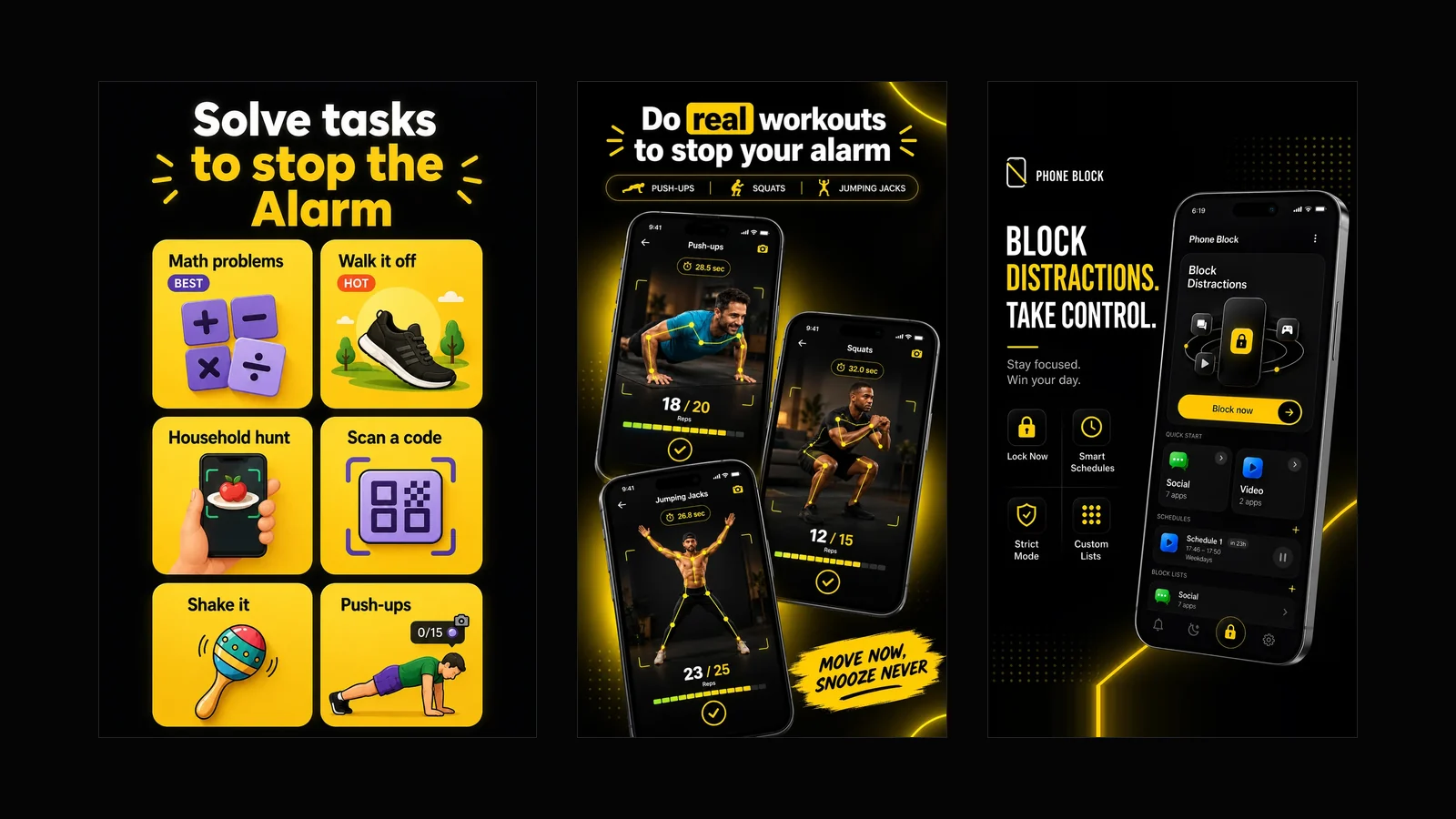
That gap is why Beyond Alarm exists, so read this as the biased section it is. The missions are there — push-ups, squats and jumping jacks counted by the camera, a photo of somewhere you have to walk to, a household hunt, a step count, plus maths, memory, typing, barcode and shake, up to five stacked on one alarm. Morning Lockout then starts the moment the mission is finished, so your chosen apps stay shut while you are getting up rather than from a time you guessed the night before. Phone Block and scheduled blocks cover the rest of the day. Where it deliberately stops: no sleep tracking, and browser-dependent website blocking rather than a network-wide filter. If either of those is what you came for, Sleep as Android and AppBlock are the right answers and this is not. Beyond Alarm is free on Google Play.
Before you switch anything
- Work out which row you are in. People leave Alarmy for opposite reasons, and the app that answers one makes another worse.
- Test the new mission awake, in daylight. Especially a camera one: stand still in front of it for a minute and see whether the count climbs on its own. It sometimes does, and a mission you can beat standing still is not a mission.
- Do the battery settings for whatever you install. Otherwise you will conclude the new app is broken too.
And if none of the rows is really yours — if Alarmy wakes you up fine and you just fancy a change — the honest advice is to stay. It is the most proven app in this category and a change of icon has never got anybody out of bed.
Sources
Download counts, ratings, review counts and update dates were read from each app's Google Play listing on 31 August 2026. Feature claims come from the apps' own Play descriptions on the same date. Prices are deliberately not quoted: they vary by country and change without notice, and a number printed here would be wrong somewhere the day it was published.
Common questions
What is the best alternative to Alarmy?
It depends entirely on why you are leaving. Too aggressive — Alarm Clock Xtreme. Want real sleep tracking — Sleep as Android. Want something tiny with no subscription — QRAlarm. Get up fine but then lose the morning to your phone — Beyond Alarm, which is the only one here that also blocks apps once the alarm is done. There is no single replacement, because people leave for opposite reasons.
Is there a free alternative to Alarmy?
Alarm Clock Xtreme is the most complete free alarm here and it is ad-supported rather than crippled. QRAlarm's free tier covers the scan-to-dismiss mission, which is the whole app. Every option in this post has a free tier worth a week of your time, so try before you pay anything.
Why do people stop using Alarmy?
Three reasons come up repeatedly: it does more than they wanted and the extra gets in the way, the free tier stops short of the mission they actually need, or it wakes them successfully and the morning still disappears into their phone afterwards. Only the third is a problem another alarm app cannot solve.
Which alarm app is hardest to turn off?
Any whose mission needs the camera pointed at something in another room, because that is the only kind you cannot finish in bed. Alarmy's photo and barcode missions, QRAlarm's QR scan, and Beyond Alarm's photo and camera-counted exercise missions all qualify. Maths and shaking do not — both work fine under a duvet.
Is Alarmy worth paying for?
If the mission you need is behind the paywall and it gets you up, yes — it is the most proven app in this category and it has more ways to force you out of bed than anything else. The question worth asking first is whether waking up is really your problem, or whether it is the hour after.
Are there alternatives to Alarmy that block apps too?
One, in this comparison. Alarmy, Alarm Clock Xtreme, Sleep as Android and QRAlarm are all alarms and nothing more. Beyond Alarm's Morning Lockout holds your chosen apps shut after the mission is finished, and its Night Lockout does the same before bed.
We build Beyond Alarm, an Android alarm app that will not switch off until you have actually moved. Most of what we write here comes out of problems we hit building it.
Beyond Alarm
An alarm that keeps ringing until you’ve actually moved — then blocks the apps that pull you back to bed. Free to start, no account.
Keep reading
What Beyond Alarm actually does
Every part of the app in one page — solve tasks to stop the alarm, kill the morning and night doomscroll, schedule your blocks, lock the phone on a timer. Free with ads, and what it deliberately does not do.

Alarmy vs Beyond Alarm — a straight, feature-by-feature comparison
Missions, pricing, platform support, app blocking, sleep tracking — compared directly, with the numbers dated and sourced rather than asserted.