
Push-up alarm
You can't do push-ups lying in bed. Beyond Alarm's exercise missions keep the alarm going until the camera has counted every rep, and reps you don't really do don't count.


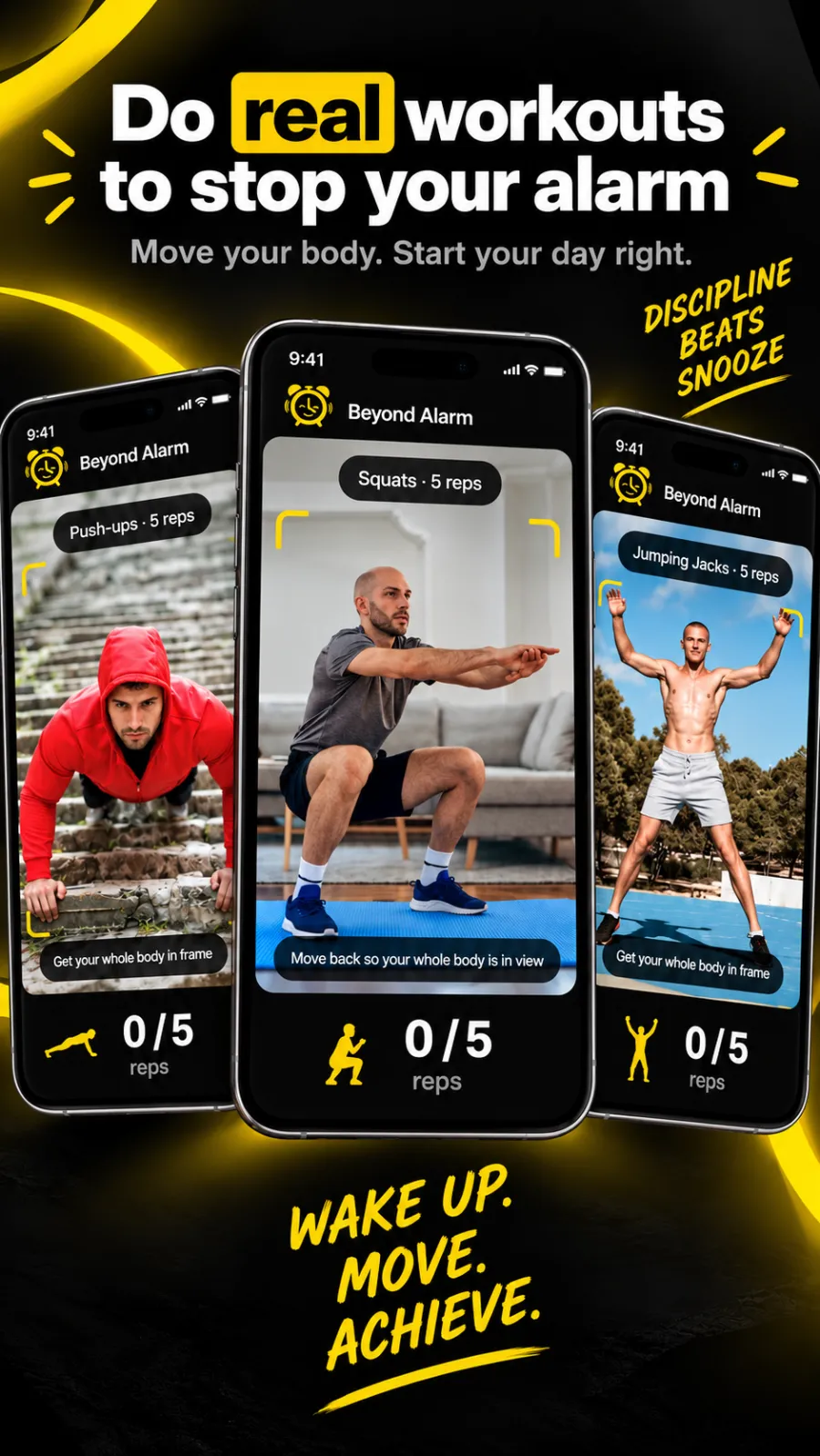
The surest way to stop going back to sleep is to make the alarm impossible to switch off from bed. Beyond Alarm's exercise missions do just that. The alarm keeps going until you've finished your push-ups, squats or jumping jacks, counted one by one by your phone's front camera. Everything is worked out on the phone, and it's hard to fake.
What it does
Add an exercise mission to any alarm and stopping it is no longer one tap. When the alarm goes off you start the mission, prop the phone up, step back and move. A big counter climbs with each rep, and the alarm stops at your target.
- Three exercises: Push-ups, Squats and Jumping Jacks.
- 3 to 20 reps per mission (5 by default).
- Stack them: up to five missions on one alarm, say 10 squats and then a maths problem. On the free plan, each mission after the second takes one short ad to add.
- On-device and offline: pose detection runs on the phone, and no frame is uploaded anywhere.
The screen coaches you as you go: "Lower your chest", "Push all the way up", "Bend your knees, sit low", "Jump — arms overhead". And if you stop making progress for 20 seconds, the alarm sound comes back.
How it works
Each exercise turns your pose into a single measurement: the elbow angle for push-ups, the knee angle for squats, arm height for jumping jacks. A rep is a full trip from the top position to the bottom and back. Then several checks have to pass before it counts:
- The core has to be clearly seen. Your shoulders and hips must be tracked with confidence. A face held close to the lens isn't enough. For push-ups the camera has to see your hips, so you can't fake it with a close-up.
- Each position has to hold. The top and bottom of a rep must last several camera frames in a row. One jittery frame can't flip the count.
- The joint has to really move. The angle must change by a real amount, not drift a few degrees.
- The body has to really move. Your body has to travel a real share of its own size during the rep, across the frame or towards the camera. This catches someone standing still and waving an arm. It's measured against your own size on screen, so it works whether the phone is a metre away or across the room.
- It has to take a human amount of time. A rep that's impossibly fast, or too close to the last one, is treated as noise.
The checks are strict about your core, where a fake fails, and forgiving about wrists and ankles, which are the first things to blur in a dim bedroom.
Beyond Alarm
Beyond Alarm does this part for you: the alarm will not switch off until you have actually moved, and the apps you pick stay locked afterwards.



When to use it
- You sleep through ordinary alarms, or you switch them off without waking up.
- You want movement first thing. Ten squats wake your body up faster than any snooze.
- Pair it with Morning Lockout, so the apps you'd scroll in bed stay shut once you're up.
Set it up
- Open the Alarm tab and tap + for a new alarm, or tap an alarm to edit it.
- Under Wake-up mission, tap an empty + box.
- In the Mission list, choose Push-ups, Squats or Jumping Jacks.
- Set the number of reps, then tap Preview to try it now.
- Tap Done, then Save.
When it rings, prop the phone up facing you and step back until "Get your whole body in frame" goes away.
Related
Common questions
How does the push-up alarm know I really did the reps?
The front camera tracks your body with on-device pose detection. A rep only counts when your shoulders and hips are clearly in view, the joint really bends and straightens, your body actually moves, and the rep takes a human amount of time.
Does the camera video leave my phone?
No. Pose detection runs on the phone itself. No frames are uploaded, and the mission works without an internet connection.
How many reps can I set?
From 3 to 20 per mission, with 5 as the default. You can stack up to five missions on one alarm if one set isn't enough.
Where should I put the phone?
Prop it up facing you, far enough back that your whole body is in frame. Side-on and head-on both work. The screen tells you to step back if it can't see enough of you.
Is the push-up alarm free?
Right now, yes. Every feature in Beyond Alarm is free during the current promotion, and Pro removes the ads. It works on Android and iPhone.
Beyond Alarm
An alarm that keeps ringing until you’ve actually moved — then blocks the apps that pull you back to bed. Free to start, no account.
More features
Free Strict mode
No stop button until the timer ends. Free with one short ad, on Android and iPhone.
Phone Block
Block chosen apps or the whole phone for a set time. Regular mode or free Strict mode.
Whole-phone block
Android: every app locked until the timer ends. Calls still come through.
QR and barcode alarm
The alarm stops only when you scan a QR code or barcode. Keep one a room away from bed.
Photo alarm
Register a place the night before. The alarm stops only when you photograph it again.
Alarm reliability check
Checks battery, auto-start, exact-alarm and full-screen settings, with one tap to each fix.
Prevent power-off
Android: the power menu closes while the alarm rings. Optional uninstall protection.
Wake-up streaks
A run of kept wake-ups for each repeating alarm, plus a warning before you break it.
Daily Phone Block reminder
A daily nudge an hour before your usual Phone Block time, learned from when you really block.
Beyond Alarm on iPhone
AlarmKit alarms, wake-up missions, and Screen Time blocking with free Strict mode.